The 5 step guide to telling better stories with your photography

We all love stories.

We love to read them and we get excited watching them.

But sometimes we forget to use storytelling in our photography when documenting our everyday family moments.

How do we tell a story in a picture? What main elements do we need to keep in mind while capturing and telling our story? Here’s a start.

1. Keep your camera ready.

Keep an eye out for key moments as you never know what opportunity might come along. Storing your camera in a central location like the living room or the kitchen island makes it easier to grab at a moments notice. If you’re out and about, having it wrapped around your neck, ready to go.

How do we tell a story in a picture? What main elements do we need to keep in mind while capturing and telling our story? Here's a start.

2. Follow the heroes.

Show us who they are and what they do using clues. There’s always a main subject in a story – showcase them using environmental shots and supporting objects.

For example, our clues on the beach are sand, waves, seaside line, rocks, wind in the hair, birds, safeguard’s building, umbrellas in the sand, etc. Tell us their story, what they do and what they see.

How do we tell a story in a picture? What main elements do we need to keep in mind while capturing and telling our story? Here's a start.

How do we tell a story in a picture? What main elements do we need to keep in mind while capturing and telling our story? Here's a start.

3. See and shoot through the moment.

Observation, as well as intuition, can help you feel when a moment is about to happen. Be prepared to capture the critical moment your instinct is telling you is coming. For example…

As soon as a one-year-old tastes the cake for the first time, their next action is to dive their face right into it.

When an officiant announces Mr. and Mrs. for the first time, just moments after their first kiss as husband and wife, be ready for the huge smiles and fist pumps.

The moment your toddler wiggles free from the towel after an evening bath, you know they’ll giddily go streaking through the house.

Shoot less when you sense these moments! Instead of rapidly depressing the shutter button, slow down and focus on the best composition and wait for the moment to come to you. It allows you find one showcasing strong image when everything lines up perfectly, making a significant difference in impact to the viewer.

How do we tell a story in a picture? What main elements do we need to keep in mind while capturing and telling our story? Here's a start.

4. Capture the in-between moments.

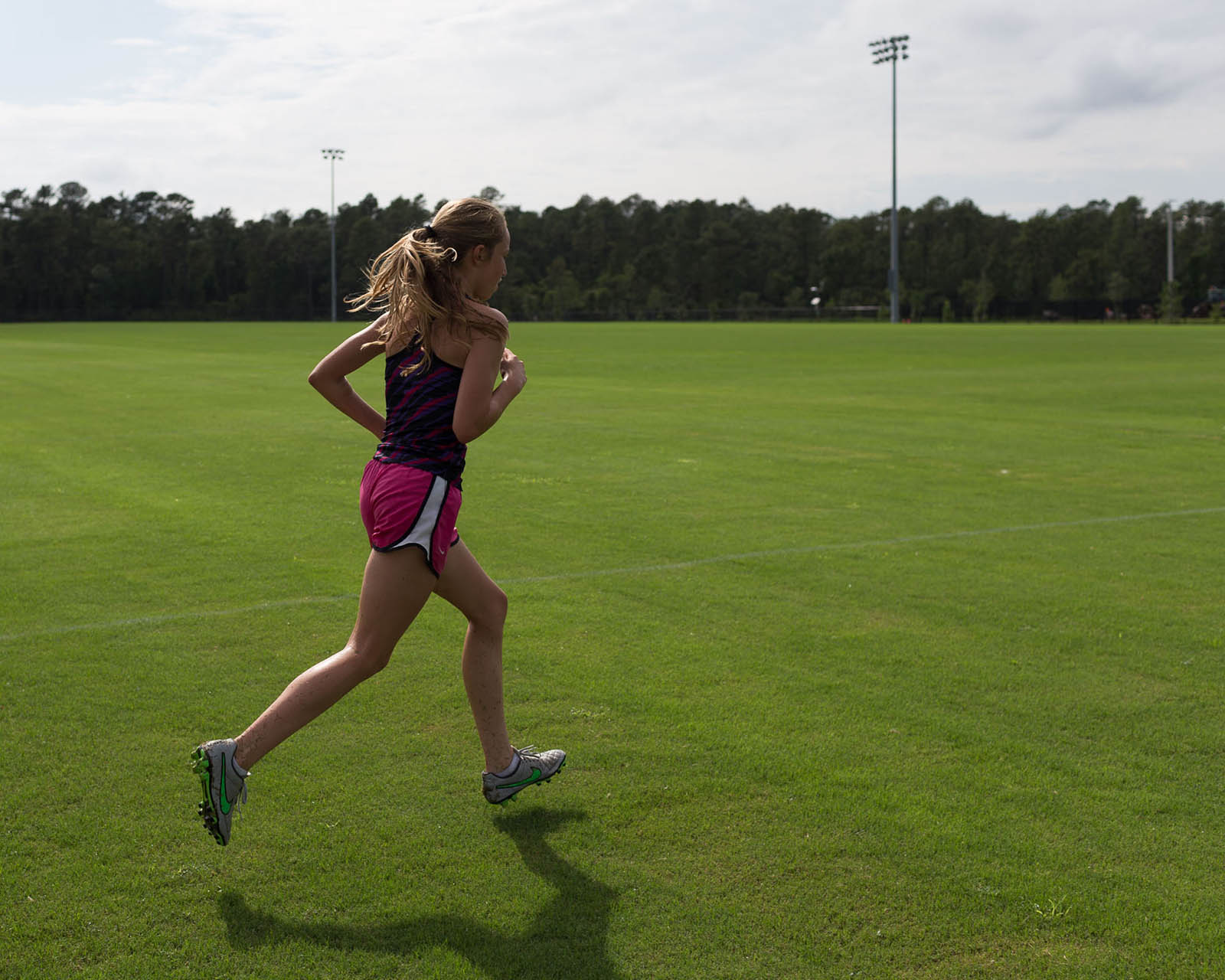
Shoot the story transitions like when a subject walks or runs from one location to another, moving from one part of the story to another. These details allow the viewer to FEEL the moment, imagining the action and visualizing a full story based on the split-second moment.

I love to capture the details of movement following my subjects from one location to another.

How do we tell a story in a picture? What main elements do we need to keep in mind while capturing and telling our story? Here's a start.

How do we tell a story in a picture? What main elements do we need to keep in mind while capturing and telling our story? Here's a start.

5. Remember your story line.

Have a definite beginning, middle and end of your story similar to a movie screenplay or a novel.

You can tell your story in many photographs starting with an environmental wide angle shot to set the location of the story. Then capture the details like toys laying in the sand, movement in the grass, people walking towards their destination, etc.

Further on, you can photograph actions as well as quiet moments, keeping in mind the mood and emotion that you’d like to relay.

The end of the story will differ depending on your ending. Some endings may include a sunset photo on the beach, flowers on the side of the road, sleeping kids in the car exhausted after a big trip. How you end will depends on the feel of your story.

How do we tell a story in a picture? What main elements do we need to keep in mind while capturing and telling our story? Here's a start.

How do we tell a story in a picture? What main elements do we need to keep in mind while capturing and telling our story? Here's a start.

Only you know what’s important to the story, the treasured moments for your family. Make sure you choose the right angles and perspectives to accurately capture and tell your story, always reiterating the subject and story.

Always remember to enjoy your family moments. Try not to just be behind the camera but also include some self-portraits of you with your family.

Let the adventure begin!
Clickin Moms online photography forum

The post The 5 step guide to telling better stories with your photography appeared first on Clickin Moms blog: Helping you take better pictures one day at a time.


Clickin Moms blog: Helping you take better pictures one day at a time

Posted in Photograpy How To | Tagged , , , , , | Leave a comment

Gnarbox 2.0 SSD Announcement

Gnarbox 2.0 on Desk

Having just reviewed both WD My Passport Wireless SSD and the original Gnarbox, I came to the conclusion that both were half-baked solutions (with each having its own list of pros and cons) due to all the performance, hardware and software issues I encountered. It looks like while I was busy reviewing the Gnarbox, the team behind the product was already busy releasing the next iteration, “Gnarbox 2.0 SSD”. After looking at the details of this major release, it appears that most of my concerns have been addressed.

[Read More…]

The post Gnarbox 2.0 SSD Announcement appeared first on Photography Life.

Photography Life

Posted in Photograpy How To | Tagged , | Leave a comment

How I edit high contrast black and white photos (plus an editing video)

I’ve fallen in love with high contrast black and white images.

I can’t wait to share with you how I get this look!

When converting to black and white, all images aren’t created equal. Certain images just seem to shine in black and white.

When choosing images to edit in a high contrast black and white style, look for images with lots of contrast. You want really bright areas and really dark areas.

Pay attention to your use of light. Strong directional light, patches of hard light, rim light, and backlight give you bright brights and dark shadows.

Contrast can also come from a wide tonal range. Images with mostly middle gray won’t have a big emotional and visual impact.

I’ve fallen in love with high contrast black and white images. I can’t wait to share with you how I get this look! When converting to black and white, all images aren’t created equal. Certain images just seem to shine in black and white.

At first you may not be able to look at your “straight out of the camera” color image and tell if it has enough contrast to work well in black and white. Don’t worry. With practice over time, you’ll begin to see potential black and white images more easily.

I’ve fallen in love with high contrast black and white images. I can’t wait to share with you how I get this look! When converting to black and white, all images aren’t created equal. Certain images just seem to shine in black and white.

I’ve fallen in love with high contrast black and white images. I can’t wait to share with you how I get this look! When converting to black and white, all images aren’t created equal. Certain images just seem to shine in black and white.

Lightroom editing tip: Right click on the background behind your image and change the background color to white. Editing on a pure white background helps you see white whites and black blacks. Your final edit will have more contrast.

I’ve fallen in love with high contrast black and white images. I can’t wait to share with you how I get this look! When converting to black and white, all images aren’t created equal. Certain images just seem to shine in black and white.

Look for images that are emotive and expressive.

I’ve fallen in love with high contrast black and white images. I can’t wait to share with you how I get this look! When converting to black and white, all images aren’t created equal. Certain images just seem to shine in black and white.

Look for images with strong graphic elements like lines, shadows, and geometric shapes.

I’ve fallen in love with high contrast black and white images. I can’t wait to share with you how I get this look! When converting to black and white, all images aren’t created equal. Certain images just seem to shine in black and white.

Once I’ve selected my photo, I do my black and white edit in Lightroom.

Now here’s a secret that not many people know. I start all my black and white edits with a preset. Casablanca available in the Cinema Presets Sampler is my go-to preset. It’s where I start all my black and white edits.

In the following video, I walk you through a high contrast black and white edit, starting with the Casablanca preset. I’ll show you how I make an image really pop by tweaking the preset to fit my own personal vision.

One caveat. When I was videoing this edit, I often couldn’t get my mouse to line up perfectly with what I was saying. So if I say, “Increase exposure +25,” and you notice that my mouse had a mind of its own and landed on +26, please don’t worry. For the sake of time, I considered that close enough and just kept going.

Also, to save time, I cropped and straightened the image before starting the video.

In review, here are the steps I took in this edit:

  1. I selected, cropped, and straightened the image.
  2. I adjusted the exposure and white balance and moved the shadow slider to the right.
  3. I applied the Casablanca preset.
  4. After applying the preset, the shadows were still too dark so I moved the shadow slider further to the right.
  5. I used radial and graduated filters to direct the light in the image.
  6. I moved the clarity slider all the way to +78. Clarity is one of my go-to adjustments for high contrast black and white edits.
  7. I played with the color sliders. I moved the orange slider right to brighten her skin. I also moved both the yellow and green sliders to the right just a bit to brighten the grass and trees. Color sliders are another big way I up the contrast in my black and white edits.
  8. Sharpening: Amount +52, Masking +92.
  9. Noise Reduction: Luminance +31.
  10. I removed the grain added by Casablanca.
  11. I moved the dehaze slider to the right just a bit.

I’ve fallen in love with high contrast black and white images. I can’t wait to share with you how I get this look! When converting to black and white, all images aren’t created equal. Certain images just seem to shine in black and white.
original photo

I’ve fallen in love with high contrast black and white images. I can’t wait to share with you how I get this look! When converting to black and white, all images aren’t created equal. Certain images just seem to shine in black and white.
preset only

I’ve fallen in love with high contrast black and white images. I can’t wait to share with you how I get this look! When converting to black and white, all images aren’t created equal. Certain images just seem to shine in black and white.
final edit

Clickin Moms online photography forum

The post How I edit high contrast black and white photos (plus an editing video) appeared first on Clickin Moms blog: Helping you take better pictures one day at a time.


Clickin Moms blog: Helping you take better pictures one day at a time

Posted in Photograpy How To | Tagged , , , , , , , , | Leave a comment

Recommended Camera Settings for Landscape Photography

Sand dunes

It is crucial to set your camera properly if you want to take the highest quality landscape photos. However, with the large range of menu options and settings found in cameras today, it isn’t easy to find the optimal setup. This article covers the best camera settings to use for landscape photography, including many options that are “set it and forget it” parts of the menu that you rarely will need to adjust. Keep in mind that all of these are personal recommendations rather than absolute necessities, but they will be useful if you are trying to figure out where to start with your own camera in the field.

[Read More…]

The post Recommended Camera Settings for Landscape Photography appeared first on Photography Life.

Photography Life

Posted in Photograpy How To | Tagged , , , , | Leave a comment

WD My Passport Wireless SSD Review

WD My Passport Wireless SSD

One of the challenges of photographers who work in the field is to make sure that their data is always fully backed up. While many photographers rely on either keeping two copies of their images on different memory cards, some prefer to manually back up their work using a laptop or a dedicated backup device. For a number of years now, Western Digital has been providing backup solutions specifically aimed at photographers and the new WD My Passport Wireless SSD-series storage devices are specifically targeted at enthusiasts and professionals, who want to be able to backup their work hassle-free in the field. In this review, we will be taking a closer look at this device and see how it fares as a backup solution for photographers.

[Read More…]

The post WD My Passport Wireless SSD Review appeared first on Photography Life.

Photography Life

Posted in Photograpy How To | Tagged , , | Leave a comment