How Color Impacts Photographs

Warm and Cool Colors in Aspen Trees

At a technical level, color can be complicated; just see our recent article on sRGB vs Adobe RGB vs ProPhoto RGB. But at an artistic level, it is one of the most important parts of an image, impacting emotions and interest unlike almost any other element of photography. This article introduces the concepts of color and color relationships, including how to use them to take the best possible photographs.

Photography Life

Posted in Photograpy How To | Tagged , , | Leave a comment

How to change colors in Lightroom and Photoshop (with editing videos!)

Picture this scene: you are out and about with your kids. The perfect photo opportunity presents itself. You have your camera with you to capture it all. But, UGH!  What are they wearing?!

Perhaps it is a neon orange t-shirt or maybe your child is like mine and her favorite color is beige. Color can really make or break a photo! A pleasing color combination will elevate a photo from ‘meh’ to ‘yaaassss!’

Enter color replacement.

It may sound like a complicated editing trick, but it’s actually quite simple. I’m sharing two highly effective ways to replace a color in an image. Whether you use Lightroom or Photoshop, I’ve got you covered.

How to replace color in Lightroom

I really love the following image (shot at 1/2000 F2.2 ISO 100…any guesses to where we are?!). However, I’d like to change my daughters shirt to a primary color. While her peach shirt is okay, a color to compliment the red and blue already in the image would be better.

First go to the Develop module. Grab the adjustment brush from the Basic panel and choose saturation as your effect. Paint all over the area that you want to change with a medium feather at 100% flow. You can check the “auto mask” box to help you stay in the lines, if you like. I prefer to wing it!

Once you have fully “painted” in the area you wish to affect, bring your saturation slider down to -100.  Now the area you painted will not have any color. You will be able to see if you missed any areas and clean those up.

PRO TIP: You can use the Alt or Option button to turn your adjustment brush into an erase brush. This can help clean up any messy work (no judgment!). Be sure to zoom in on your image to check those small areas around the edges or near the hair! 

Next, click on the rectangular box labeled “Color” and choose the new color. For this image, I chose a nice bright yellow.  After you have chosen your color you can adjust the exposure, contrast, et cetera to your liking.

The best part? If you change your mind, just activate your selection again and pick a new color and add new adjustments!  So simple, so fun!

As you can see, this image is much improved by this simple change.  And when done correctly, no one will know you used a little Lightroom magic!  Now, you can feel free to  snap away in the Target parking lot without having to run in the store to buy the kids a new shirt!

Follow along with my Lightroom editing steps in this video!

How to replace color in Photoshop

There are countless ways to change colors in Photoshop. Today I am going to show you one that I think is the easiest and most effective.

I chose to work on this image of my daughter commanding an army of chickens, concentrating on her blue jacket.

First, open your image in Photoshop and duplicate the background layer (Command or Control + J).

Next, go to Image —> Adjustments —> Replace Color.

A box will pop up and you can use the dropper tool (it looks like a little eye dropper) to choose the color you want to change.

Then, use the dropper+ (it’s the dropper with the plus sign next to it) to add more of that color to your selection.  You can also change the fuzziness slider to change the amount of color it effects.

Once you have your selection made, you can move the Hue, Saturation, and Lightness sliders to change the color just the way you want it.

Don’t worry if this affects more of the image than you expect. Only pay attention to the area your wanting to work on. We will fix the rest soon!

When you find that perfect color, press OK. Now, add a layer mask to that layer and invert it (command + I).  Everything should look like it did when you started.

Grab a soft paint brush at 100% opacity on white. Paint in the area you are trying to change ( I painted on her jacket). This is the most involved part of the process, but a little patience goes a long way. If you make a mistake, switch to a black paintbrush and clean it up. That’s the joy of working with Layer masks!

And Viola!  You don’t need to invest in costly clothing, all you need is Photoshop! This method could have been used to change the colors of any part of these images.  Who doesn’t want to see blue trees, red grass or purple chickens?!

Now go forth, be creative, play, and have fun!

Follow along with my Photoshop editing steps in this video!

The post How to change colors in Lightroom and Photoshop (with editing videos!) appeared first on Clickin Moms blog: Helping you take better pictures one day at a time.


Clickin Moms blog: Helping you take better pictures one day at a time

Posted in Photograpy How To | Tagged , , , , , | Leave a comment

sRGB vs Adobe RGB vs ProPhoto RGB

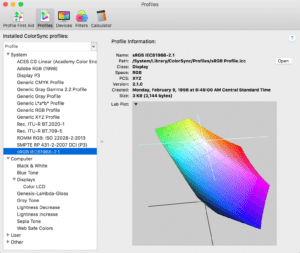
sRGB 3D View in ColorSync Utility

Color spaces are essential in photography; they apply in some way to every photo you take. The most well-known color spaces are sRGB, Adobe RGB, and ProPhoto RGB. But what makes them so important? Beware: There’s a lot of misinformation about this topic online. Outdated and inaccurate recommendations abound – but so does a lot of valuable information, if you’re willing to learn it. This article introduces sRGB, Adobe RGB, and ProPhoto RGB, and when to use each one.

Photography Life

Posted in Photograpy How To | Tagged , , | Leave a comment

Sony RX100 VI Review

Sony RX100 VI

Announced in June 2018, the RX100 VI is the latest iteration of the Sony’s RX100 series of pocketable high-end compact cameras. The last few years haven’t been kind on point-and-shoot cameras with smartphone cameras now the tool of choice for most casual photographic situations. This has nearly eradicated the point-and-shoot camera market, but one niche segment remains seemingly unscathed: advanced bridge cameras like the Sony RX100 VI. With its large 20.1-megapixel stacked 1-inch imaging sensor, the RX100 VI captures more detailed images and video than any smartphone. In times past, the powerful sensor was enough of a selling point, but over time, Sony has had to continually add new features to make the RX100 series more competitive. On the RX100 V, that meant increasing the burst rate to 24fps and adding advanced focus features. With the new RX100 VI, Sony has gone with an 8.3x optical zoom range with a f/2.8-4.5 variable aperture 24-200mm equivalent lens. That gives the Mark VI noticeably greater reach than the 24-70mm equivalent lens of its predecessor. However, there is a tradeoff as the new lens’s maximum aperture settings of f/2.8-4.5 are a lot narrower than the f/1.8-2.8 range on the 24-70mm lens of the Mark V. This not only means that you’ll be losing the shallow depth of field capabilities of previous RX100 offerings, but it also means noisier images and videos in low-light settings.

Photography Life

Posted in Photograpy How To | Tagged , , | Leave a comment

How to photograph the holidays (while still being part of the fun!)

Every family has one: The Family Story Keeper. If it’s you, you know the position is an honor.

And yet, the role comes with some dilemmas. Can you balance your own artistic vision with that of your family’s as you photograph a gathering? How do you stay present in the moment while still getting the shot? How do you tell your genuine holiday story without laboriously documenting every minute of it?

The holiday season is right around the corner. Let this be the year you have your Christmas cookies…and eat them too! I know that you can experience a relaxing, refueling holiday and can still shoot the images of your dreams.

First of all, let’s be clear about what you shouldn’t be doing. If shooting on holidays and at family events zaps your energy and doesn’t fill you up creatively, you have every right to step down from this role. Personal photography should be enjoyable and inspiring!

If you stop bringing your camera to gatherings, I promise others will take on the role. After all, everyone’s got a camera in his or her pocket! It’s perfectly okay to let them document the holidays with their phones. Many people do and those photos are to be treasured.

What is not okay is for you to dread family get-togethers because you feel like you are on duty or working the whole time. Take a step back and evaluate if this is how you feel. If so, consider leaving your camera at home this holiday season.

If, on the other hand, you enjoy bringing your camera along at holiday gatherings but simply seek a bit of balance, this is for you!

Embrace all styles of photography…even if they aren’t what you shoot professionally

I used to think that when I documented a family event, I had to stick very closely to my professed style of documentary photographer. I avoided all look-here-and-smile pictures and inwardly groaned when groups asked me if I could arrange a big posed photograph.

Then, a few years passed and I began to notice gaps in my photos. For example, I don’t have as many smiling images of my late aunt as I would like. I don’t have whole group photos to remind me of who had which hairstyle or who was dating whom.

As soon as I noticed the photos that were missing, I loosened up. I encourage you to take smiling, camera-aware photos for family and friends. If you are a portrait photographer, be sure to capture the candids alongside the posed shots. They don’t have be great. The light doesn’t have to be perfect or even good. If you can get it exposed properly and in focus, that’s good enough!

Be sure that everyone knows what to expect

Even though I’m open to taking more posed photos, I’ve talked to my family about my preference for unposed, documentary style images. They know I’m likely to be lurking in corners and on chairs with my camera, and they’re used to it. These are the photos I love to make. They are the reason I continue to bring my camera everywhere I go.

If you’re a family story keeper seeking balance between taking photos for others and making your own art, talk to your family! Be open and honest about why you love the craft of photography and communicate what kinds of photos you hope to make this holiday season. It’s a two way street! If you are open to grabbing some shots for them, they should allow you to also partake in whatever genre or style that you love most.

Go in with a big plan

Once you and your family are on the same page, it’s important to have a plan. It’s easy to get overwhelmed by all there is to capture during the holidays! If you try to get it all, you are likely to feel exhausted and defeated with a card of 2,000 photos to sift through.

To avoid that trap, take time to identify the holiday traditions and gatherings that matter to you most. Ask yourself the following questions:

“What are the traditions would I be sad to see left undocumented?”

“Are there any events coming up that I’ve photographed every year that could stand to be skipped this time?” 

“Is there an activity coming up that I could use as a creative challenge?”

Then formulate a plan with the answers to these questions in mind. Make a list of the things that you definitely want to capture and those things that you are okay taking off your plate this year.

Make specific plans

The second part of my planning happens in short reflective moments before each activity. If you will be decorating the Christmas tree, you might ask yourself what top three shots you hope to come away with from that activity.

Next, think about how you can capture those shots differently than your first instinct. Perhaps you will vary your lens choice. Or, as simple as it may sound, stand in a different spot the living room than you  usually do to document the story.

Once I know a few things I want to do differently, I decide on my “shot list.” (Of course, we aren’t talking about planning some complicated wedding shot list.) My mental shot list is loose and flexible and subject to change.

To flesh out that tree decorating plan, you might try to grab some extra wide shots of the family decorating the tree. You could then get some close images of the kids putting on their baby ornaments or any other special role they play in this tradition.

Having these specific shots in mind means that the camera only needs to be out and in your hands for a small fraction of the tree decorating time. Once you’ve accomplished those goals, it can go away so that you can be fully present.

At extended family gatherings, you might plan ahead to get a smiling shot of all the cousins (or aunts and uncles or whatever groups make sense). Even as a documentary photographer I love  to see these photos through the years to see how we all grow and change.

At present opening time, I try to be intentional about knowing beforehand what reactions I want to capture. I know that I need to have the camera ready when Grandma opens her handmade gift from the boys, but I can probably leave it alone when my husband opens his socks…ha!

Again, this planning frees me up from photographing the whole time gifts are being opened. I still get to tell the story while also enjoying the joy of giving and receiving.

Be part of the story you are telling

What I’m really advocating for is practicing some mindful shooting this holiday. I always lament that the season can feel too over indulgent with too many excesses looming everywhere I look.

But I’ve come to realize that I contribute to those excesses in more ways than one. I don’t need to over document the holidays because when I do, it leaves me feeling the opposite of peaceful. With some planning, I can shoot for myself, for my family, and my friends. And I can still come out on the other side happy with the images and memories I made.

So give yourself the gift of thoughtful shooting this year in the form of extra pauses, self-reflection, and communication. It may be just the thing you need to enjoy your role as your family’s story keeper.

The post How to photograph the holidays (while still being part of the fun!) appeared first on Clickin Moms blog: Helping you take better pictures one day at a time.


Clickin Moms blog: Helping you take better pictures one day at a time

Posted in Photograpy How To | Tagged , , , , | Leave a comment