Significant Nikon Rebates in the USA

Nikon Z6 vs Nikon D750

Nikon USA has just announced significant price reductions on many of its DSLR cameras and lenses, as well as huge price drops on both Z6 and Z7 mirrorless cameras. Most Nikon DSLRs are seeing permanent MSRP price drops, while the instant rebate program for lenses has been extended to a big list this time, with some lenses getting up to $ 650 off. And although none of the Z-series lenses are being discounted at this time, the price of the Nikon Z6 has been reduced by $ 200, while the Z7 is now a whopping $ 600 off. We went through the whole rebate list and decided to share our top picks with our readers.

Photography Life

Posted in Photograpy How To | Tagged , , | Leave a comment

Manual Focus or Autofocus for Landscape Photography?

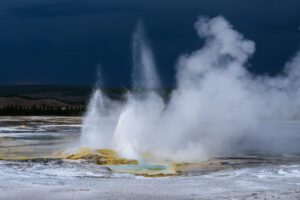
Autofocus Landscape Geyser

Landscape photography is often slower paced than other genres, allowing for a more methodical approach to composition and camera settings. That includes focusing; manual focus is more popular for landscapes than most other genres. Indeed, there’s a whole market of third-party manual focus lenses geared almost exclusively to landscape photographers. But autofocus still has its benefits. So, which method is right for you?

Photography Life

Posted in Photograpy How To | Tagged , , , , | Leave a comment

4 Tips for taking better photos with your phone camera

Have you been looking for a way to push yourself creatively and improve your photography skills? The key to doing just that might very well be in your hand at this very moment. Yes, I’m talking about your cell phone!

You may just use your phone camera for simple snapshots. But your phone is capable of so much more! With some intention and a few helpful tips shared below, you can take photos with your cell phone to rival your DSLR images.

Mobile-Photo-Tips1-portrait-of-woman-with-curly-hair-and-yellow-shirt-chanel-french

Use an app that gives you more control while shooting

It may feel limiting going from your DSLR to your mobile phone for photography, but it doesn’t have to be that way.

Sure, your big camera has a thousand knobs and dials to control every aspect of your photo. But did you know that there are apps that will allow you to have more control over the images you take with your phone’s camera too?

Look for an app that allows you to easily change your settings. An application that lets you have full control over exposure, white balance/color temperature, ISO, shutter speed, and focal point will allow you to get more intentional results in any shooting situation. By having the option to control these factors, you’ll begin to feel more creative with the images you’re producing from your mobile phone.

Join Clickin Moms today

Also, just like shooting in RAW is recommended in order to have the most latitude in photo editing, the same is true for your mobile photography. Utilize an app that allows you to shoot with your phone in RAW format so you have more control during the editing process.

These are some favorites that allow you to have more control over the final image than your phone’s built-in camera:

VSCO
Lightroom Mobile
ProCamera
Camera +2

The more you understand the app you’re using to take your photos, the better your images are bound to turn out. It’s important to take the time out to really learn how to maximize your available apps just as you would learn to better operate your DSLR.

Mobile-Photo-Tips12-woman-on-tile-floor-from-above-chanel-french

Consider photographic elements

It’s easy to feel like taking a photo with your mobile phone is nothing more than a quick snapshot. You pick up your phone, snap the photo without much thought, then toss your phone back into your purse and continue about your day.

When you’re shooting with your DSLR, however, I’m willing to bet that you take the time out to really plan. You evaluate your surroundings before you begin shooting. You observe the light and contemplate how you want to use it. Then you start looking for the perfect composition, the ideal color combinations, and other photographic elements that you can incorporate.

Well, guess what? It should be no different when you’re shooting with your mobile phone. Before you start snapping away, you should still be taking all of these factors into consideration.

A photo taken with any camera will be elevated with good light. Using compositional techniques to guide you viewer to your subject will make any photo more impactful. Perspective, color theory, and texture will all add to the value of your photos. The camera does not dictate any of these variables…you do!

Want more tutorials from this author? Check out this Clickin Moms member EXCLUSIVE tutorial from Chanel!

Avoid falling into the trap of always grabbing those quick and mindless snapshots with your phone. Instead, slow down and take a moment to really think through the photo you want to create before you press the shutter button.

Mobile-Photo-Tips6-blades-of-grass-with-dew-on-them-chanel-french

Treat your phone’s camera like a DSLR with a prime lens

The best thing about prime lenses is how they push you to be creative. Unlike a zoom lens, with a prime lens you have to move your feet and switch up your POV while you’re shooting in order to avoid all of your images looking the same.

When shooting with your mobile phone, keep this same frame of mind. Make sure to remember to move around and utilize different angles while you’re shooting to add variety to your photos.

When you’re shooting don’t be afraid to get closer to your subject for a macro-like shot. Look around you and take note of all of the opportunities to capture things both above and below you. Take a few steps back so you can capture the wider shots that include the environment. Crouch down for the closer shots that create intimacy with your viewer.

Step outside of your box and really push yourself to realize all that you can do with your phone by simply changing your position. Instead of thinking of your phone camera’s single focal length as a limitation, look at it as an opportunity to shoot differently.

Mobile-Photo-Tips4-dog-curled-up-by-door-in-sunlight-before-and-after-chanel-french

Take the time to edit your photos

If you feel like your photos taken with your mobile phone are lacking a bit of polish, you may just need to spend more time with your editing process.

Having more control over your camera and shooting with more intention are both necessary steps in the process to take a quality photo. However, editing your photo after you’ve taken it can really elevate your mobile photography.

When you’re editing your photos from your DSLR, you often enhance the basic factors such as the brightness, contrast, and saturation. You may also focus on more in-depth editing such as color toning and using the healing tool to remove distractions in the frame.

Go beyond simply adding a filter to your photo and get more in depth with your editing to really enhance your mobile phone photos. Some of my favorite apps to edit photos are:

VSCO: They have awesome presets that you can then edit for a more natural and custom look.
Snapseed: I love this app for in-depth editing, especially it’s Healing and Portraiture tools.
Lightroom Mobile: this app allows you to upload your presets so you can keep cohesiveness between your mobile phone photos and your DSLR photos if you desire.

Related: Using Lightroom Mobile to make your life on the go easier

If you want to improve your mobile photograph skills, you need to take more control, slow down and take your time, and shoot with intention. With practice, you might be surprised at what type of art you can create with this tool you carry around every day.

Become a Member of Clickin Moms

The post 4 Tips for taking better photos with your phone camera appeared first on Clickin Moms blog: Helping you take better pictures one day at a time.


Clickin Moms blog: Helping you take better pictures one day at a time

Posted in Photograpy How To | Tagged , , , , , | Leave a comment

When to Use a Polarizer for the Best Results

Mastering Polarizers Thumbnail

Polarizers are perhaps the single most important filter for digital photographers, but you need to know how to use yours correctly if you want the best results. In this week’s video, I’ll explain everything you need to know about using polarizers to get the look you desire.

Photography Life

Posted in Photograpy How To | Tagged , , | Leave a comment

When you should edit your photos in black and white

I tend to process my images in color more than black and white. I love rich tones and color often lends emotion and depth to a photo.

However, there are compelling reasons to choose black and white over color. Let’s explore the top 10 reasons for converting your images to black and white.

Timelessness

There is a timelessness with black and white photos that color photos just cannot replicate. A black and white conversion can make our images look like they could be taken at anytime in history. 

black and white photo of kids standing in front of tree house by mickie devries

This image was taken back in 2013 and remains one of my favorites. It reminds me of The Little Rascals (which likely dates my age quite a bit…ha!). The black and white conversion here makes it so that the colors of the play set and the kids’ clothes do not date the photo.

Instead, they look as though they could be kids from today or decades ago. This timelessness adds to the universality of the scene making the image that much more impactful.

Related: Watch Mickie convert a photo to black and white in this video tutorial!

Emotion

Color can most certainly speak to emotion. However, taking away color can allow other emotional elements (such as facial expression, body language, etc.) to really shine.

Join Clickin Moms today

By stripping away all the color information, you can hone in on the story of the image. We feel the emotion the artist is trying to project, rather than just viewing it.

black and white photo of girl with birthday cake and candles smiling by mickie devries

color photo of girl with birthday cake and candles smiling by mickie devries

In this shot of my daughter, I am immediately drawn in by her obvious joy on her birthday. While I like the color version, I find I get distracted by the pretty colors. Her joy isn’t the first thing I notice. As the emotion is the most important aspect of the frame for me, a black and white edit is an easy choice to make here.

black and white photo of girl pulling out tooth by mickie devries

In this photo, I really wanted to capture what it felt like to pull out your tooth. It’s something we can all relate to, but it’s easily forgotten once childhood fades.

Again, while the colors were fine, I felt that they distracted from the furrow of her brows and the pained anticipation of pulling the tooth out. By converting this to black and white, those details are at the forefront of the frame.

Connection

Black and white is perfect for showing connections between people, objects, and pets.  It again allows us to better imagine how the subjects might feel rather than just looking at a pretty colors. No matter if it is a little child holding her lovey, siblings bonding, a newly engaged couple looking deep into each other’s eyes, or the married couple of 50 years sharing a laugh together, black and white is a sure way to draw the viewer into the connection.

black and white photo of three young boys by vironica golden
image by Vironica Golden

I love how photographer Vironica Golden captures her boys and their connections. In this photo, those connections are amplified by her conversion to black and white. Without the potential distraction of color, the viewer can immediately see the love and playfulness they share.

Minimize distractions

Often times I choose to convert to black and white solely because the colors in the image are kind of distracting. Colorful background elements may distract from the intended subject. And while my kids think that neon clothes are awesome, they are not quite so in photos (and those neon color casts! Ugh!).

black and white photo of kids blowing bubble gum by mickie devries

color photo of kids blowing bubble gum by mickie devries

In this example I wanted to guide the viewer to the bubble blowing contest by eliminating all the crazy colored play clothes they were wearing. With a black and white conversion, the potential for someone to look at the rainbow of clothing first is eliminated. Instead, the viewer goes straight to their faces where they can see the intensity of the bubble contest unfolding.

Member Exclusive! See Mickie edit this photo in this member exclusive forum video tutorial! 

Emphasize light

While images in beautiful light are gorgeous in color, they can be particularly amazing in black and white.  Often times I convert to black and white to really showcase the light and how it falls on my subjects.

black and white photo of girl blowing bubbles by mickie devries

A black and white edit here makes it so that the light and shadows are center stage. While the iridescent colors of the bubbles are beautiful in their own right, I wanted to emphasize their shapes and the dimension of my subject’s features.

black and white photo of girl with freckles

Emphasize details

Black and white can really emphasize details like freckles, sand, dirt, water, and any other type of texture. It allows the contrast in to shine in a way that just doesn’t happen when editing in color. I often convert to black and white if I want to really show off my daughter’s freckles.

Add drama

Sometimes converting to black and white can make an otherwise boring photo very dramatic. We often associate colors with emotion. However, if the color is in conflict with the drama of a scene, I find converting to black and white quite helpful.

black and white photo of girl diving into water by mickie devries

color photo of girl diving into water by mickie devries

I love to do this when I have a lot of negative space, so that my subject really stands out in the frame. In this underwater image, the blue of the pool made everything feel just a bit too light and airy. By converting to black and white, it is as though she is diving into an unknown abyss, adding drama to the scene.

Cover-up bad color

This may not be the BEST reason for converting to black and white. But if I’m being honest I do convert when I just don’t want to deal with fixing mixed lighting or bad color casts. That said, the image still has to have a good range of tone to be a good candidate for a black and white edit. It’s not going to work in every situation, but it really can save a lot of time editing if you like the image in black and white.

black and white photo of girl drinking water from hose by mickie devries

color photo of girl drinking water from hose by mickie devries

In this photo I didn’t want to deal with the green color cast on her skin from the grass. So I tried it in black and white. I ended up loving it in black in white not only because it dealt with the color cast but also because it brought out her freckles and the texture of the water.

black and white photo of girl standing in woods by mickie devries

girl in yellow dress standing in woods by mickie devries

Add an eerie factor

Black and white can lend a scary, mysterious feel to photographs. Here is an example where converting to black and white really makes all the difference in making things feel a little eerie.    

Unify images

Sometimes I want to show a collection of images taken on different days, times of day, and locations, but I still want the images to be unified.  Converting to black and white can really pull a collection of different images together.

black and white series of portraits by mickie devries

color series of portraits by mickie devries

Take these two screenshots as an example, one showing the colored versions (sooc) and one showing the edited black and white images, which looks better for a wall display?

Good range of tones/contrast

Is every image a good candidate for black and white? Definitely not! Sometimes we need the color information to make a photograph interesting. I find this often happens in flat light.

Let’s look at this example where color is the predominate factor in making the image compelling, does it also work in black and white?

color photo of girl standing in mountain landscape by mickie devries

black and white photo of girl standing in mountain landscape by mickie devries

In my opinion, it does not. The dynamic range of tones falls too much into the midtones. When I choose to convert to a black and white,I want it to have a range of tones from blackest blacks to lightest whites and a whole range of varying midtones in between. Even if the image meets any of the reasons for converting in this article, it will not convert well to black and white if there is not a good range of tones.

At times you can use editing to push the contrast of the image. Some of my favorite Lightroom methods for doing this are using the clarity slider in Lightroom or adjusting the individual color channels in Lightroom to make parts of the image darker or lighter.  I also love to add more contrast in Photoshop with curves layers.

Black and white processing isn’t always the right choice for a photograph, but when it is used with intention, it can make all the difference in communicating with your intended audience. Try playing with different images and take the time to see how it changes the mood. You may find that black and white is the key to meeting your artistic vision!

Become a Member of Clickin Moms

The post When you should edit your photos in black and white appeared first on Clickin Moms blog: Helping you take better pictures one day at a time.


Clickin Moms blog: Helping you take better pictures one day at a time

Posted in Photograpy How To | Tagged , , , , | Leave a comment